Mac app · Apple Silicon & Intel

StreamAmp

Retro audio, modern streaming.

Miss the golden era of desktop audio? Tired of bloated, sluggish music apps taking up half your screen? StreamAmp brings the iconic, compact and endlessly customizable late-90s media player experience natively to macOS – now supercharged with full Apple Music integration.

  • Apple Music
  • Classic .wsz skins
  • Native Swift
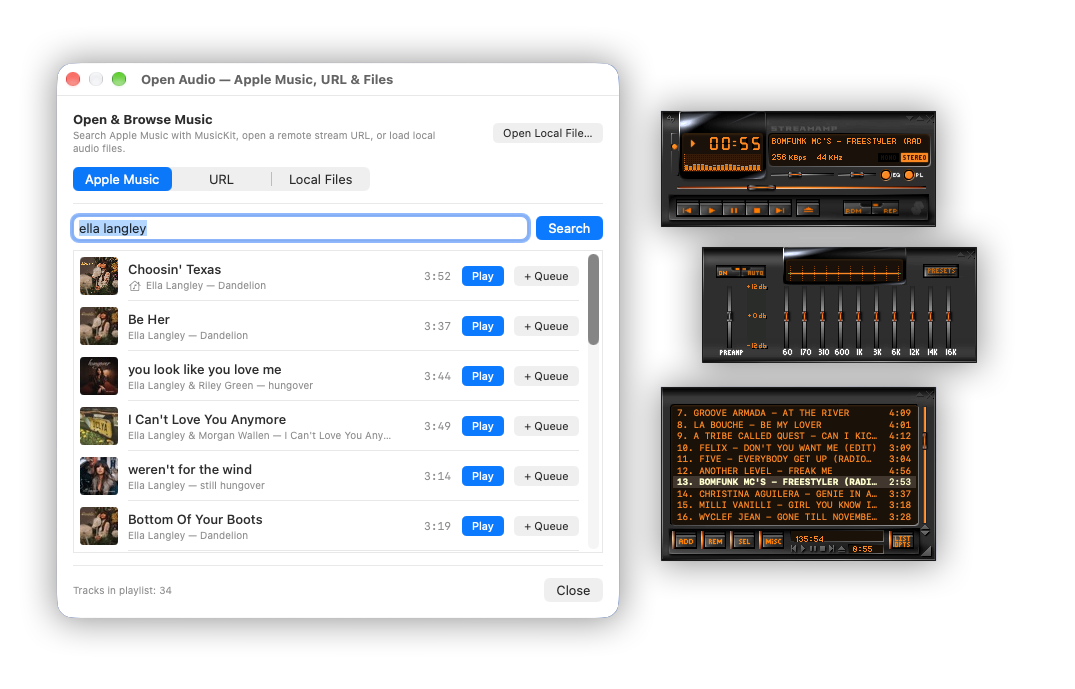
StreamAmp on macOS showing the retro main player deck with spectrum analyzer, 10-band equalizer and playlist editor docked together

Your entire audio world in one pixel-perfect deck.

Whether you're a die-hard digital crate digger with terabytes of local MP3s or a dedicated Apple Music subscriber, StreamAmp unites everything you listen to inside a nostalgic interface.

  • 100M+Apple Music songs¹
  • 6Audio formats
  • 10EQ bands
  • 0Frameworks & bloat

Everything you loved. Nothing you didn't.

The legendary media deck, rebuilt from the ground up as a native macOS app.

Seamless Apple Music integration

Browse, search and stream over 100 million songs directly through a classic retro deck.¹ Natively integrated with Apple MusicKit and enabled automatically through macOS – no need to share any credentials with the app.

Local file powerhouse

Drag and drop your local folders with zero friction. Full native support for MP3, FLAC, ALAC, WAV, AAC and OGG files with instant metadata reading.

Classic skins & Windowshade mode

Load your favorite classic .wsz skins or stick to the legendary default dark-metal aesthetic. Dock main window, equalizer and playlist editor together – or collapse StreamAmp into a tiny top-bar strip.

10-band graphic equalizer

Sculpt your sound with a responsive 10-band EQ complete with preamp control, classic presets like Rock, Techno and Full Bass & Treble, and custom curve saving.

Internet radio & Icecast/Shoutcast

Tune into thousands of live internet radio streams or paste your own custom stream URLs (.pls / .m3u) for endless background beats.

Spectrum analyzer & oscilloscope

Watch your audio come alive in the classic green-and-red LED mini-visualizer right on the main deck – complete with true-to-original peak falloff speeds.

Flip through the classic EQ presets.

Pick a preset to see the curve StreamAmp's 10-band equalizer applies – the same way you remember it from the late 90s.

Equalizer Flat
Pre
60
170
310
600
1K
3K
6K
12K
14K
16K

Why StreamAmp?

Modern music apps treat your desktop like a billboard. StreamAmp treats your Mac like a stereo component.

It stays out of your way, respects your screen real estate and gives you tactile, immediate control over every track you play.

Built native for macOS

Engineered from the ground up for Apple Silicon and Intel Macs, written in Swift and SwiftUI.

Ultra-low CPU & RAM

Enjoy the blast from the past on the most modern software architecture – light enough to leave running all day.

No bloat, no frameworks

No third-party tools and no web views. Just your beloved media deck as a true native Mac app.

Respects your screen

Dock the windows together or collapse them into a tiny Windowshade strip at the top of your screen.

Press play in three steps.

No account to create and no credentials to hand over.

  1. Install StreamAmp

    Download StreamAmp from the Mac App Store. It runs natively on both Apple Silicon and Intel Macs.

  2. Bring your music

    Drag in your local folders, paste a .pls or .m3u radio stream – or let macOS enable your Apple Music subscription automatically.¹

  3. Make it yours

    Load a classic .wsz skin, dial in the 10-band EQ and dock the playlist editor exactly where you want it.

Good to know.

Quick answers before you press play on a legend.

Do I need an Apple Music subscription?

Only for streaming from Apple Music. Your local files and internet radio streams work without a subscription. If you do subscribe, Apple Music is enabled automatically through macOS.

Do I have to enter my Apple ID in StreamAmp?

No. StreamAmp is natively integrated with Apple MusicKit, so you never need to share any credentials with the app.

Can I use my old .wsz skins?

Yes. Load your favorite classic .wsz skins, or stick to the legendary default dark-metal aesthetic.

Which audio formats are supported?

MP3, FLAC, ALAC, WAV, AAC and OGG with instant metadata reading, plus internet radio via Icecast and Shoutcast streams (.pls / .m3u).

Which Macs does StreamAmp run on?

StreamAmp is built natively for both Apple Silicon and Intel Macs, with ultra-low CPU and RAM usage.

Press play on a legend.

Rediscover the joy of owning your desktop music experience. Download StreamAmp today – or send it to the friend who still has a folder full of skins from 1999.

¹ Streaming Apple Music requires an active Apple Music subscription.

Questions or feedback? Email hello@kammerath.com.